How to Unlock Bootloader on Motorola V600
Warnings — Read Before You Begin
- Data wipe: Unlocking the bootloader will factory reset your device and erase all personal data. Back up everything first.
- Warranty void: Unlocking may permanently void your manufacturer warranty.
- Brick risk: Incorrect procedures or interruptions during the process can render your device unusable.
- Security: An unlocked bootloader weakens the device's verified boot chain, making it more vulnerable to tampering.
- OTA updates: Some devices will no longer receive official over-the-air updates after unlocking.
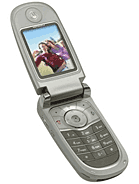
Required Tools
- Motorola Handset USB Drivers for Windows
- Motorola RSD Lite / Flash & Backup (Triplets P2K)
- Mini-USB (5-Pin) to USB-A Data Cable
Steps
Step 1: Backup Phonebook Contacts & Charge Battery
Flashing the bootloader on Motorola V600 will wipe internal storage.
1. Copy important contacts from phone memory to your SIM card.
2. Charge the phone battery to at least 80% to ensure stability during the flash process.Step 2: Install Motorola USB Handset Drivers on PC
Download and install the official Motorola Handset USB Driver package on your Windows PC. This allows your computer to interface with Motorola P2K Flash Neptune devices.
Step 3: Boot Motorola V600 into Bootloader / Flash Mode
1. Turn off your Motorola V600 completely.
2. Press and hold the '*' (Star) and '#' (Pound) keys together on the keypad.
3. While holding both keys, press the Power button.
4. The display will enter Bootloader Mode showing 'Boot Loader 05.xx / Battery OK / OK to Program'.Step 4: Connect Device to PC via Mini-USB Cable
1. Connect your Motorola V600 to your PC using a Mini-USB data cable.
2. Open RSD Lite or Motorola Flash & Backup utility.
3. Verify that your device shows status 'Connected' in the device table.Step 5: Flash Unlocked Bootloader & Patch Flex Firmware
1. Select the unlocked bootloader or unrestricted monster pack firmware for Motorola V600 (Triplets).
2. Click 'Start' to begin flashing the bootloader and security profile.
3. Keep the cable securely connected throughout the entire flashing operation.Step 6: Completion & Reboot Device
Once the flashing utility shows 'PASS / Finished':
1. Disconnect the Mini-USB cable.
2. Remove and re-insert the battery.
3. Power on your Motorola V600 — the bootloader is now unlocked and operational.